Online gaming in Ireland is mostly a European affair: between AWS datacentres, Ireland to London measures 11.85 ms and Ireland to Frankfurt 21.95 ms. Distance to the server is rarely what ruins a session. The last stretch, your own broadband, usually is, and that is the part you can change.
Below: which broadband suits gaming (fibre, fixed wireless and Starlink), what counts as a good ping, why Irish players end up on EU servers, how London and Frankfurt compare, and how to tell whether the lag is your connection or the game. Fair warning, it’s usually the connection.
Which Broadband Suits Online Gaming in Ireland?
Stability matters more than headline speed: a steady 25 ms is far better than a connection that swings between 15 ms and 80 ms.
| Connection | What to expect | Fits |
|---|---|---|
| Full fibre | Sends data as light through glass rather than electrical signals through copper, and gives gamers the lowest latency and most stable connection. | Any address that can get it |
| 4G and 5G fixed wireless | Fixed wireless access is broadband to a fixed location over 4G and 5G mobile networks. Performance may fluctuate during busy periods when more people share the network. | Rural homes without fibre |
| Starlink | Latency of 25 to 50 ms, from €29 a month, with a €349 kit (€0 upfront in some areas) and a clear view of the sky required. | Rural homes with no fibre; workable for casual gaming |
| Older geostationary satellite | Latency of 600 ms or more. | Not for gaming |
Take full fibre if your address has it. Where it does not, fixed wireless and Starlink are the two rural routes, and the way to choose between them is to measure ping and jitter on each at the hours you play. Ask the provider about any trial or cancellation window before you commit.
Whatever the connection, plug the console or PC into the router with an Ethernet cable where you can, because Wi-Fi adds variability a cable does not. If wired is not possible, use the 5 GHz band, which is faster and less congested than 2.4 GHz, though its range drops off quickly through walls, so it works best within a room or two of the router.
What Counts as a Good Ping for Gaming
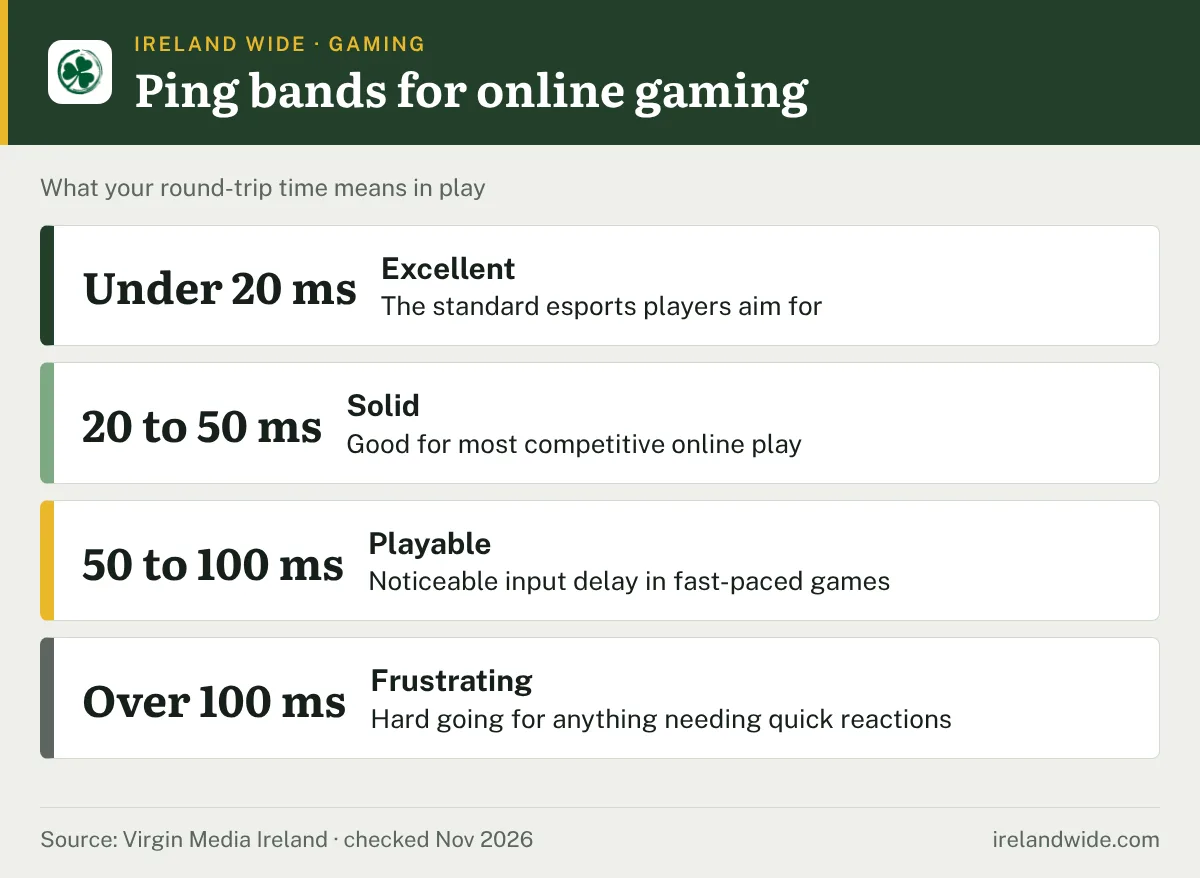
Ping is the round-trip time between your device and the game server, in milliseconds. It falls into four rough bands:
Type in your own ping, or try the datacentre figures, to see which band it lands in.
- Under 20 ms: excellent, the standard esports players aim for.
- 20 to 50 ms: solid for most competitive online play.
- 50 to 100 ms: playable, but with noticeable input delay in fast-paced games.
- Over 100 ms: frustrating for anything that needs quick reactions.
Jitter, the swing in ping from one moment to the next, can hurt more than a slightly higher average. Packet loss, data that never arrives, causes rubber-banding and stutters even when the ping figure looks fine.
Why Irish Players Use EU Servers and How London and Frankfurt Compare
Most big online games split their servers by region, and Europe is the nearest one to Ireland. For AION 2, players in the UK, Ireland, France, Germany, Spain, Italy, the Netherlands and nearby countries should start with the Europe region, then test ping to each region before committing. The physical data centre cities have not been officially disclosed.
The region you pick at character creation can matter. AION 2’s developers recommend creating a character on a recommended server.
For the distance itself, the AWS inter-region latency from Ireland to London is 11.85 ms and from Ireland to Frankfurt 21.95 ms. Those are datacentre figures, so your home connection adds to them. Even so, both can sit inside the 20 to 50 ms band above, and a wobbly home connection is what pushes them out of it.
So, in practice: a London or UK server when the game offers one, Frankfurt when it doesn’t. Then keep an eye on the in-game ping over a few evenings before you settle, because one good night proves very little.
Is It Your Connection or the Game?

Work through these in order before you reset the router or call your provider.
- Check the servers. For AION 2, the AION 2 server status page shows whether servers are online, down or in maintenance. WoW Forever players have a WoW Forever server status page for the same check.
- Ask around. If other players in the same game report lag at the same time, or only one game is bad while everything else runs normally, the problem is probably not in your house.
- Go wired. If the lag disappears on Ethernet, Wi-Fi was the cause.
- Test during the lag. Run ping and packet-loss tests while the problem is happening, because short tests miss intermittent faults.
- Test the game server, not a website. A homepage can answer fine while the game host struggles, so use the server address from the game’s own site or community.
- Find where loss starts. A traceroute shows every hop between you and the game server: loss that appears only at the final hop points to the game server, loss that starts mid-route and carries on to the final hop points to your provider, and trouble at the first hop points to your local network.
If the loss starts beyond your router, give your provider the test results rather than a description of the lag.
Frequently Asked Questions
Is Starlink good enough for online gaming in Ireland?
Starlink latency is 25 to 50 ms, which is workable for casual gaming. Older geostationary satellite broadband runs at 600 ms or more, which is too slow for most online games.
Should I pick a London or Frankfurt server?
London is closer to Ireland on the AWS inter-region figures, at 11.85 ms against 21.95 ms for Frankfurt. Pick the lower ping that holds steady for you, since a stable 25 ms beats a connection that swings widely.
Does Wi-Fi really cause lag?
Wi-Fi adds variability that a cable does not, so a wired connection is the first fix to try. If you must use Wi-Fi, the 5 GHz band is less congested than 2.4 GHz.